How do I log my meals in Calorie Counter?
You can log meals by taking a photo, uploading existing photos, scanning a barcode, or typing the food info. Calorie Counter's AI instantly analyzes the food, providing calorie and macro details.
Calorie Counter Application
You can log meals by taking a photo, uploading existing photos, scanning a barcode, or typing the food info. Calorie Counter's AI instantly analyzes the food, providing calorie and macro details.
Yes, Calorie Counter seamlessly syncs with Apple Health and Google Fit, integrating your nutrition, weight, and activity data for comprehensive tracking.
Absolutely. Whether you're following keto, high-protein, low-carb, or a balanced diet, Calorie Counter allows you to define and adjust your own macronutrient targets.
Yes, Calorie Counter is designed to support weight loss by providing detailed insights into your calorie intake, macronutrient balance, and offering personalized recommendations.
Calorie Counter's database is extensive and continuously updated. However, for the most accurate results, ensure your food entries are precise and up-to-date.
Yes, Calorie Counter provides customizable reminders to help you log meals, track water intake, and monitor your weight, keeping you aligned with your health goals.
Calorie Counter offers a free version with essential features. For advanced functionalities like detailed nutrient analysis and premium support, a subscription is available.
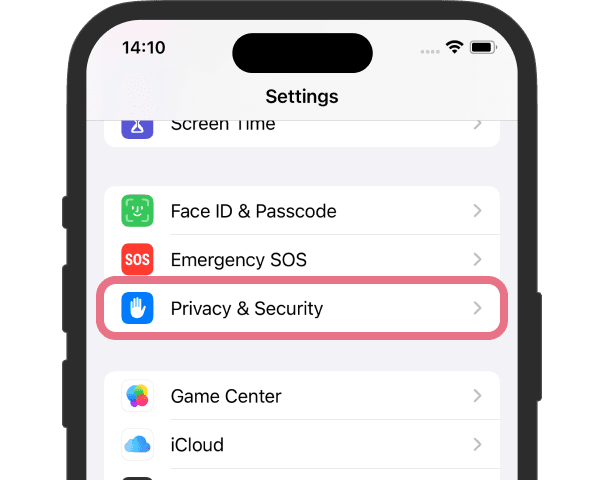
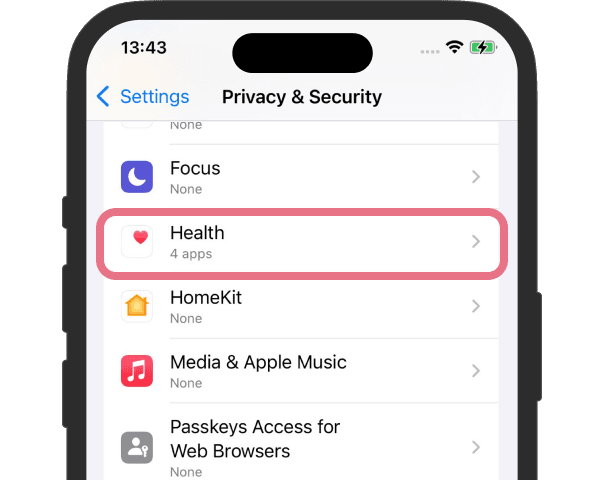
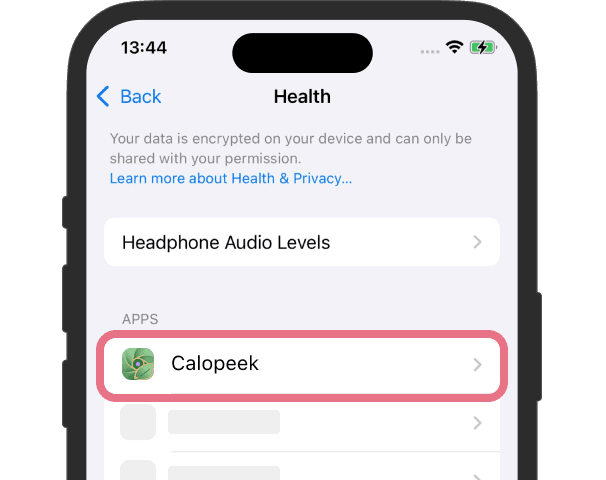
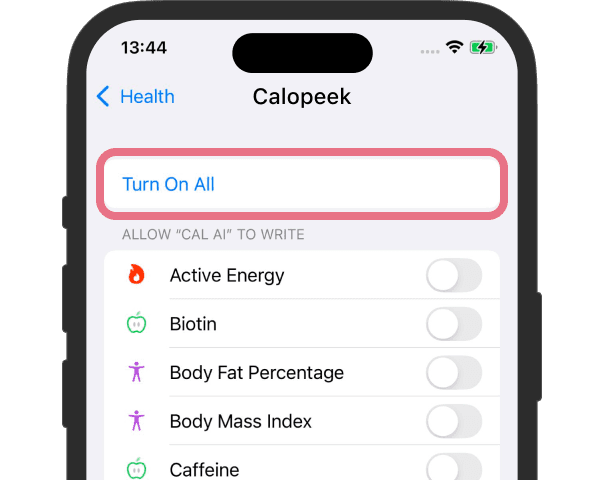
Calorie Counter needs health data access to work. If some data is unavailable, check your permissions as shown below.
1. Open Settings and Click Privacy & Security
2. Click Health
3. Click Calorie Counter
4. Turn On All
Your health data stays private. It's only stored on your device and synced via iCloud. We never upload your health information.
If you have any questions about this, please contact us:
Adelina WU PTY LTD
Email: faq@calopeek.com
Subject: Frequently Asked Questions
We are committed to protecting your privacy and will respond to your inquiries promptly.